
Split a large CSV file into smaller files (Pro)
Splitting is a CsvDrill Pro feature. Your original file isn't changed: the parts are written as new files to the folder you choose, and a cancelled job leaves no half-written files behind.
Steps
- Open the file in CsvDrill. Wait for the scan to finish; splitting reads the whole file.
- Choose Tools › Split (Pro). If Pro isn't active, the item appears locked; clicking it opens a short explanation of what it does.
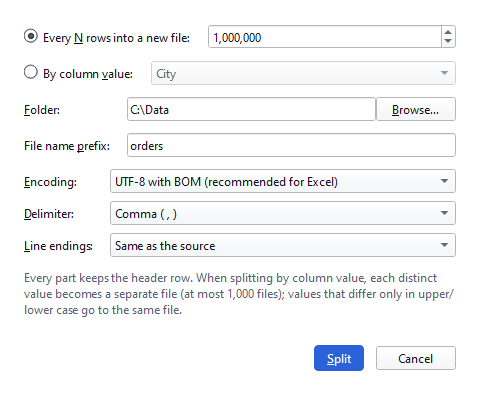
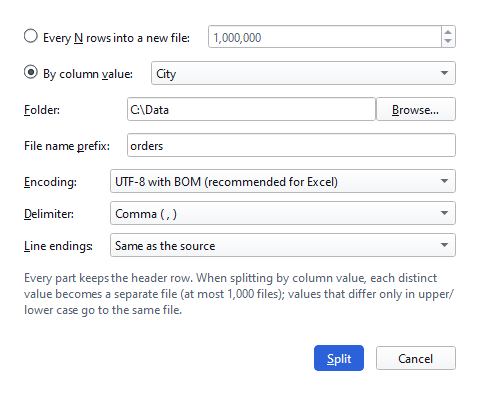
- Choose how to split. Every N rows into a new file: for example, 1,000,000 makes every part fit in Excel. By column value: every distinct value of the chosen column becomes a separate file (at most 1,000 files).
- Choose the folder, the file name prefix and the format. Parts are named prefix_001.csv, prefix_002.csv… or prefix_
.csv. The encoding defaults to UTF-8 with BOM (recommended for Excel) and the delimiter to the source's; you can change both. - Click Split. A progress bar shows the progress; if you cancel, the half-written files are deleted. If parts with the same names already exist, you are asked before they are overwritten.
Tips
- If you will open the parts in Excel, use at most 1,048,575 data rows per part; together with the header row, that is Excel's limit.
- When splitting by column value, values that differ only in upper/lower case or in characters not allowed in file names go to the same file.
- To join separate files back into one, use Tools › Merge (Pro); the files must have the same header.
Splitting rewrites the whole file; the target drive needs a little more free space than the file's size. If there isn't enough, you are warned before the job starts.
Result
Your large file is now in parts you can open in Excel or share; the original file is untouched.
Other guides
Open a large CSV file that Excel can't open
Open a CSV file beyond Excel's 1,048,576-row limit without splitting it, uploading it or changing it.
Fix garbled characters in a CSV file
Garbled letters come from the wrong encoding: choose the right one to read the file correctly, and create a UTF-8 copy or an .xlsx for a lasting fix.