Skip to content

Crop your ID photo to size and print it yourself

PassCrop frames the photo for the document size you choose, measures the head height against the guide line you set, and prepares a 10 × 15 cm print sheet. Every document size shows its official source and the date it was checked. Your photo is never sent anywhere. It cannot tell you whether a photo will be accepted for an application; nobody can in advance.

Download free Get Pro The free edition never expires · No account · No watermark
  • 9 sizes, each with its official source
  • You place and confirm the guide line
  • Your photo never leaves your computer
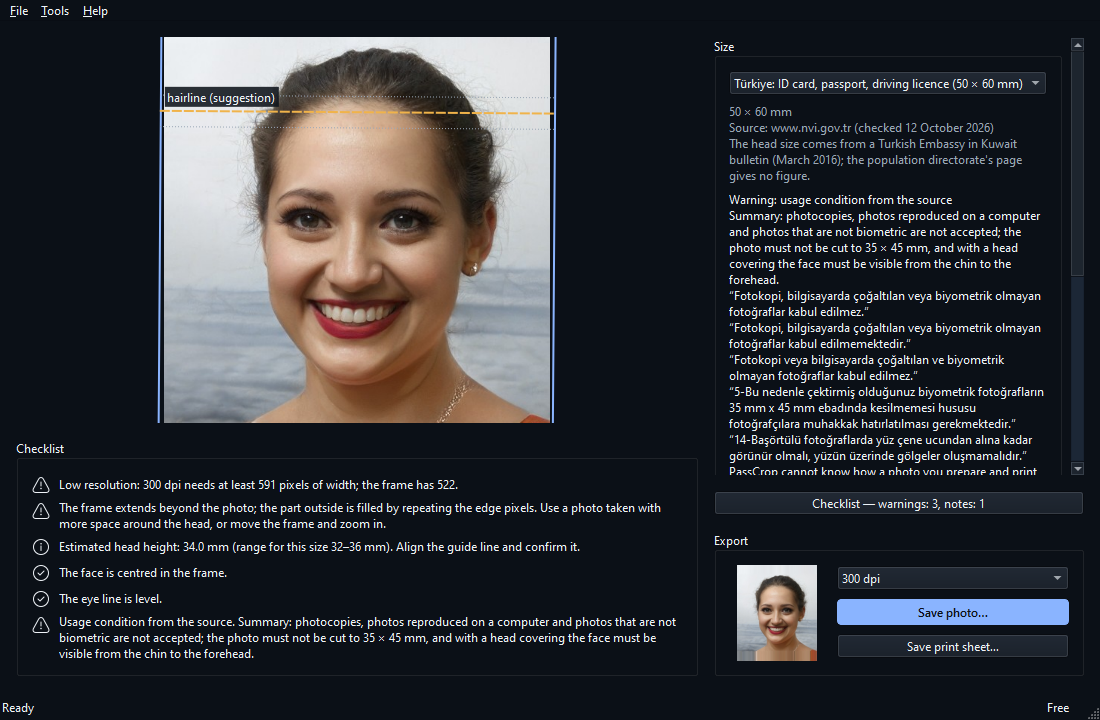
PassCrop main window: a sample synthetic-face photo shown with the frame of the chosen size; the size list and the checklist rows are on the side.

How it works

  1. Open the photo, pick the size. Open your JPG or PNG photo and choose your document's size from the list. The source of the size and the source's conditions are shown next to it.
  2. Check the frame. The program places the frame from the eyes. You put the guide line where the size asks for it (the top of the head or the hairline) and confirm it; the checklist shows head height, centring, the eye line, resolution and framing.
  3. Save and print. Save the single photo or the 10 × 15 cm print sheet. After printing, measure the 50 mm scale line on the sheet with a ruler: if it is 50 mm, the print was not scaled; to be sure, measure the width of one photo as well.

What it does and what it does not

9 sizes; the document sizes with their official sources

Türkiye (50 × 60 mm), United States, United Kingdom, France, Canada, Australia, Schengen visa, the ICAO general document size and a general 45 × 60 mm. Every document size comes from its official source, in the source's own sentences; a size whose source cannot be read does not go into the program.

Alignment and manual corrections

The frame is placed from the eyes; you move, zoom and turn it. You set the guide line for the head height, because the top of the head under the hair cannot be read from a photo with certainty.

Checklist

Head height, centring of the face, tilt of the eye line, resolution and framing are compared with the size. The rows are warnings and notes; before saving, the warnings are put to you.

10 × 15 cm print sheet

As many copies as fit, cut lines and a 50 mm scale line. You check with a ruler whether the print was scaled. In the free edition.

Offline and private

The photo is processed in memory, on your computer only. The free edition never connects to the internet; no usage data, statistics or crash reports are sent. Location and device data are not copied into the saved file.

Pro: more paper, PDF, custom size, batch

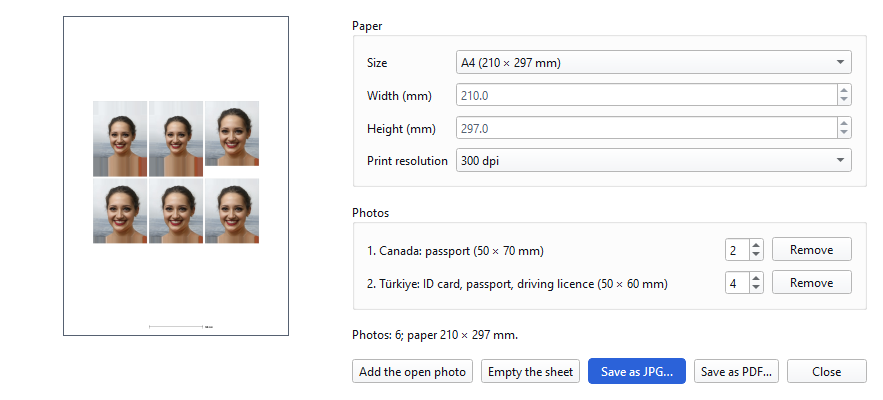
Place several people on A4, Letter, 13 × 18 cm or your own paper, save as PDF, add your own size, prepare many photos in one queue.

Limit: it cannot tell whether a photo will be accepted

Nobody can say this in advance. The program crops the photo to the size and warns; the authority you apply to decides. Light, shadows, expression, glasses, how recent the photo is and the kind of paper are not checked.

Limit: five sizes carry a warning from their own source

Türkiye: photocopies, photos reproduced on a computer and photos that are not biometric are not accepted; ask the office you apply to how a photo you print yourself is judged under this. Canada: the photo must be taken by a commercial photographer, must not be printed at home and must not be altered. France: the photo must be taken by an authorised professional or in a booth using a system approved by the Ministry of the Interior; a white background is forbidden. United States: the photo must not be altered by software and is printed on matte or glossy photo paper; photocopies and scanned photos are not submitted. United Kingdom: the photo must be printed to a professional standard on plain white photographic paper and must be unaltered by software. When you pick one of these sizes the source's sentence is shown in the program as a warning; what it means for your application is your decision.

Limit: no retouching or background change; the background row is an estimate

PassCrop only crops, rotates and resizes the photo and applies no filter. If the frame extends beyond the photo, the part outside is filled by repeating the edge pixels; the program says so as a warning. The checklist row “does the background look uniform” is shown as a note; a head covering or voluminous hair near the edge can mislead it.

Limit: HEIC does not open, a small face may not be found, not tried on children

iPhone photos are HEIC by default; switch the phone to JPEG (“Most Compatible”) or export the photo as JPG. JPG and PNG open. In full-length or distant shots the face is small and the program may say “no face was found”; use a photo taken closer, or place the frame by hand. The program was tested with adult faces; on a photo of a child or baby check the placement and the guide line by hand.

Limit: the guide line is yours, and you check the print size

The guide line is a suggestion; a verdict on the head height is given only after you have confirmed the line. The size of the output was verified in the file (pixels, print resolution, PDF geometry); it was not measured on printed paper. Printers and photo printing machines can enlarge or shrink a print, so check the 50 mm line on the sheet with a ruler.

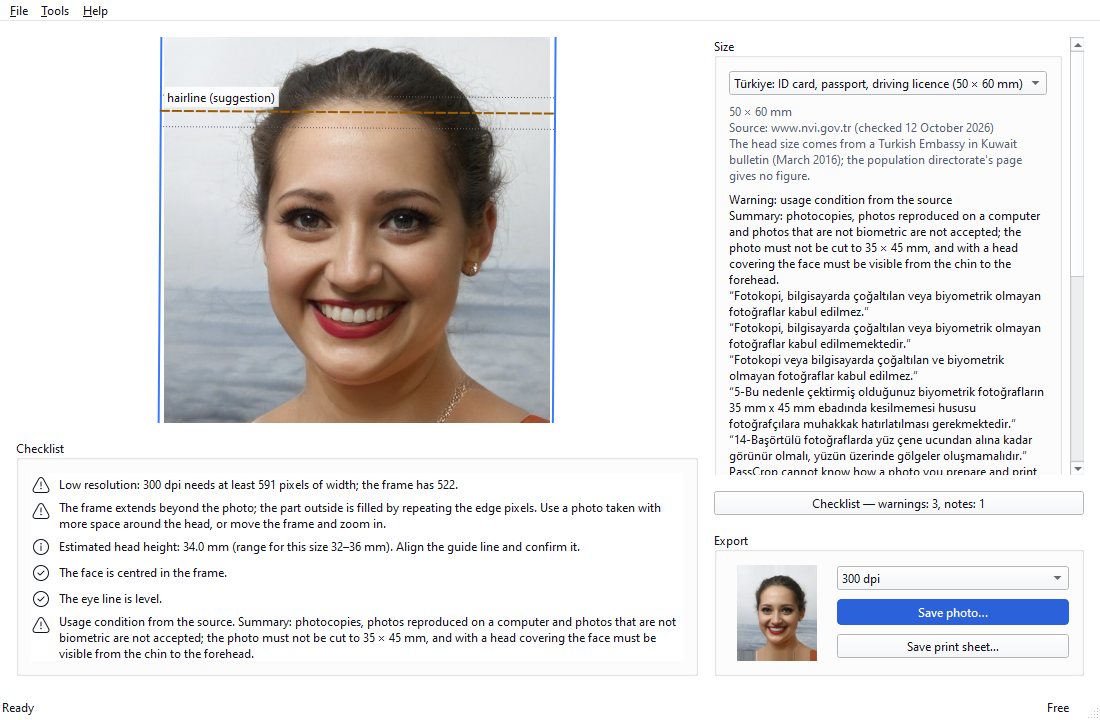
Main window in dark theme: the framed photo and the checklist.
PassCrop main window in dark theme: a sample synthetic-face photo with its frame and the checklist beside it. The interface supports light and dark themes.

Screenshots

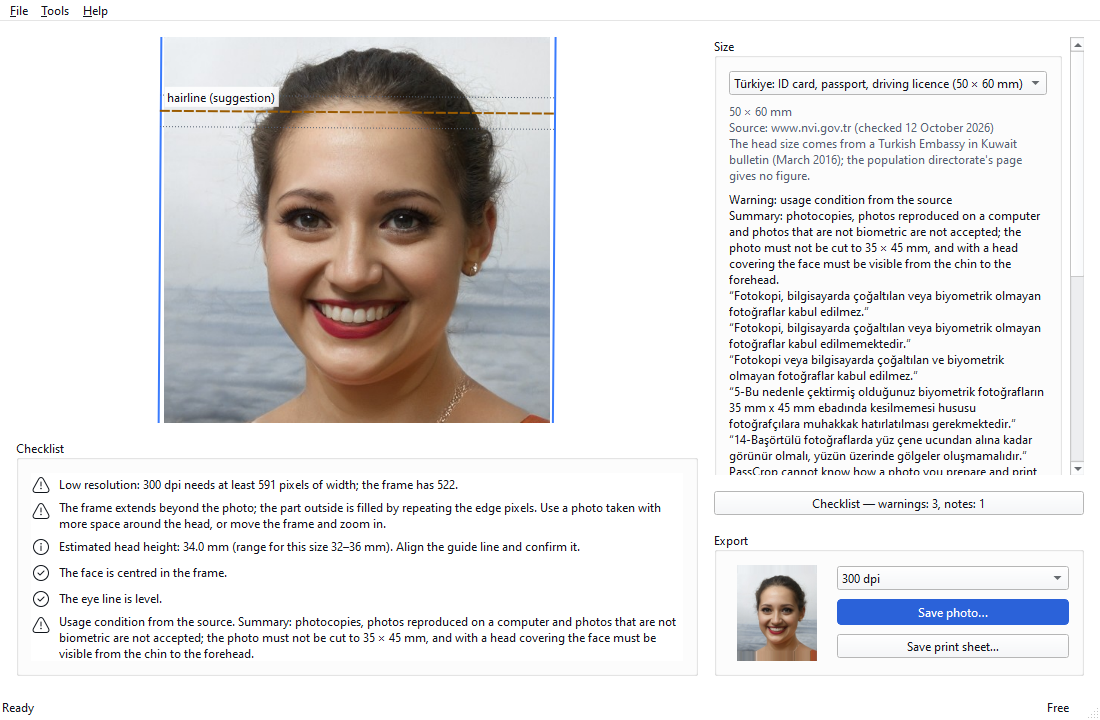
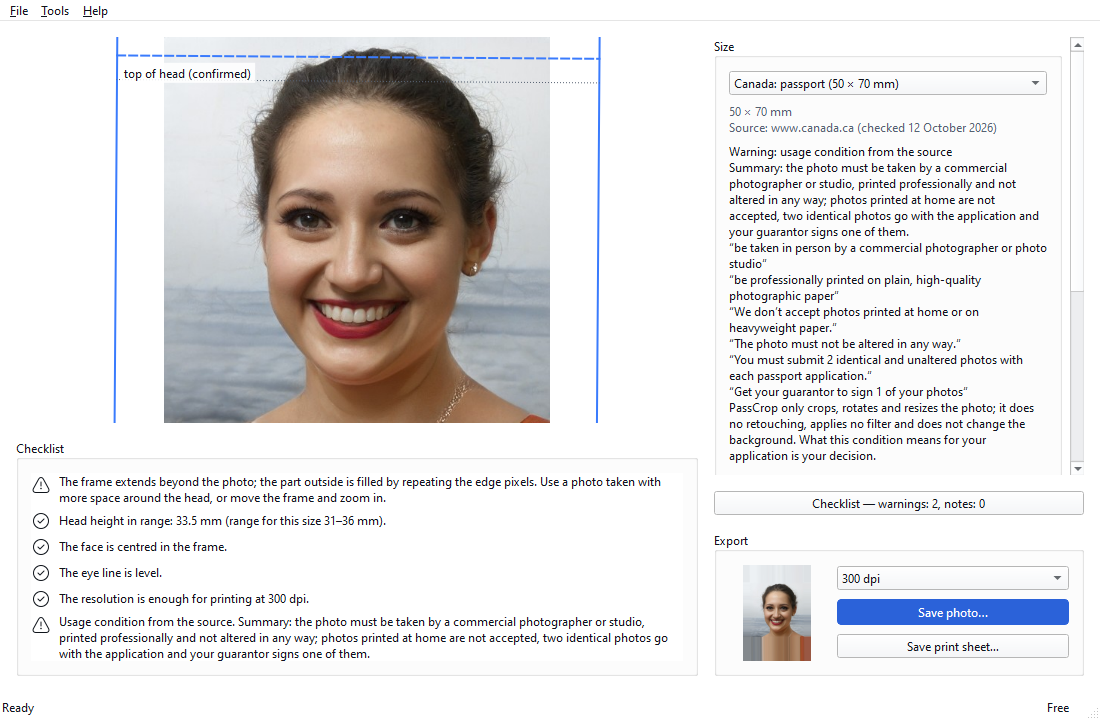
Work window: a sample synthetic-face photo, the size list and the frame; pick the size and check the frame.
The source's own condition for the chosen size is shown as a warning.
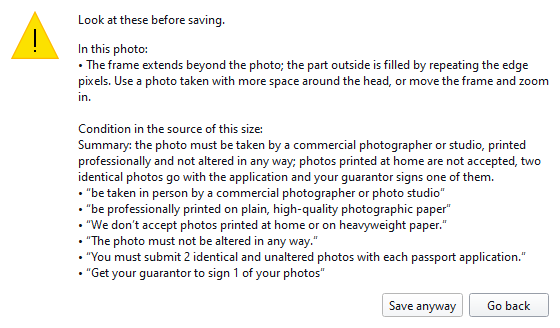
Before saving the warnings are listed and you are asked: Save anyway or Go back.
Pro sheet layout: several people and sizes on one A4 sheet.
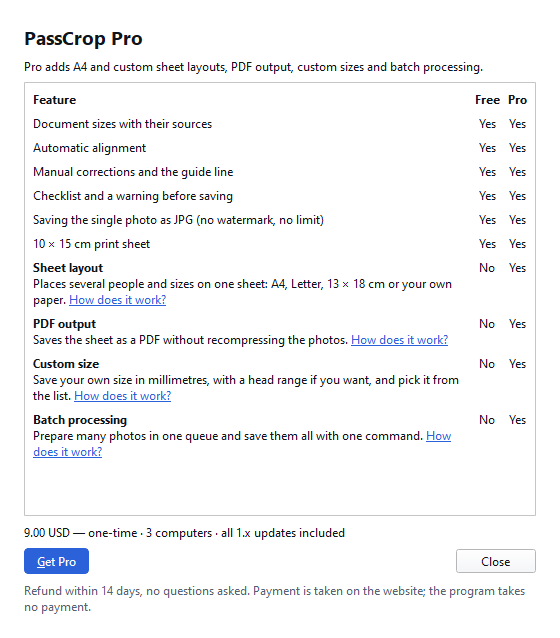
Free and Pro editions side by side: the four features Pro adds.

Free and Pro

The 9 sizes, automatic alignment, manual corrections, the checklist, a watermark-free single-photo JPG and the 10 × 15 cm print sheet are free with no time limit. Pro adds sheet layout on A4, Letter and custom paper, PDF output, custom size and batch processing.

Comparison of the free and Pro editions
FeatureFreePro
9 sizes with their sourcesYesYes
Automatic alignmentYesYes
Manual corrections and the guide lineYesYes
Checklist and a warning before savingYesYes
Single photo as JPG (DPI tagged, no watermark), unlimitedYesYes
10 × 15 cm print sheetYesYes
Sheet layout: A4 / Letter / 13 × 18 / custom paper, copies, several people on one sheetNoYes
PDF outputNoYes
Custom size (your own size in mm and a head range)NoYes
Batch processing (many photos in one session)NoYes

Our promise: no feature marked “Yes” in the Free column will ever move to Pro in a later version. The free version never expires and has no ads, account or sign-up.

Get Pro

Pro is a one-time $9. To start, enter your e-mail address; the licence key is sent to it.

The key is sent to this address only; we keep the address to send and manage the licence and use it for nothing else. Nothing is charged at this step.

Pro is a one-time payment, not a subscription.

Will my photo be accepted for the application?

PassCrop cannot know that; nobody can in advance. The program crops the photo to the size you pick, measures the head height against the guide line you set, and warns; the authority you apply to decides. The source warnings on five sizes and the program's other limits are written above, in “What it does and what it does not”, alongside the features.

Download

For Windows 10 and 11 (64-bit), no administrator rights needed; it installs per user. The free edition never expires; you switch to Pro from within the same program. System requirements: Windows 10 or 11, 64-bit · no administrator rights needed · installer 50.4 MB, installed program 196.1 MB · no internet needed; only to activate Pro and to renew it every 30 days · opens JPG and PNG, saves JPG (and PDF with Pro) · interface in Turkish and English, light and dark theme.

Download PassCrop

Version 1.0.0 · 48.1 MB · Changelog

SHA-256: 8c5c40615a3bb58e49f649ebd3bbd2a5d5c212072ee89b024b5ff885ba260604

VirusTotal scan (2026-10-14): 0 detections from 70 antivirus engines. View report

The installer carries no code-signing certificate, so Windows SmartScreen may show a warning on the first run. Click “More info”, then “Run anyway”. You can compare the file with the SHA-256 value above.

Frequently asked questions

Will this photo be accepted for my application?

PassCrop cannot know that. The program crops the photo to the size, measures the head height against the guide line and gives warnings. The authority you apply to makes the decision.

Can I take the photo at home and use it?

It depends on the country and the document. For Türkiye the source says that photocopies and photos reproduced on a computer are not accepted; ask the office you apply to. The Canadian and French sources require the photo to be taken by a professional; the United States and United Kingdom sources require that it is not altered by software; the United Kingdom also requires printing to a professional standard, the United States printing on photo paper. When you pick such a size the source's sentence is shown as a warning.

Does PassCrop change the background or retouch the face?

No. It only crops, rotates and scales the photo.

Is my photo uploaded to the internet?

No. Everything is done on your computer; the program keeps no copy of the photo and writes no temporary file.

Does the free edition add a watermark or limit the number of photos?

No. The single photo and the 10 × 15 cm print sheet have no watermark and no limit.

What is in Pro?

Sheet layout (A4, Letter, 13 × 18 cm, your own paper; copies; several people on one sheet), PDF output, custom size and batch processing. Pro is bought on this site (gelkansoft.com); one payment, no subscription.

How do I activate Pro?

After the purchase your licence key arrives by e-mail. In PassCrop paste it into Help → License… and press Activate key. The first activation needs the internet; the licence renews itself every 30 days.

On how many computers can I use it?

One key works on 3 computers. When you move to a new computer, choose Remove from this computer on the old one.

The photo from my phone does not open.

iPhone photos are in the HEIC format; PassCrop does not open HEIC. On the phone, shoot in JPEG with Settings → Camera → Formats → Most Compatible, or export the photo as JPG.

My country is not in the list.

A size is added only when its official source can be read. You can pick another size with the same dimensions, or the “ICAO general document size”, and compare it with the conditions of the authority you apply to; with Pro you can also add your own size.

What is your refund policy?

A refund within 14 days of purchase, no questions asked.